Leave folders out
What you'll do: stop backing up folders or files you don't need, to save time and space.
What you need: Deucalion; nothing else.
How long it takes: 2 minutes.
Deucalion already leaves out caches, the Trash and similar folders (see
Default exclusions). Good candidates to add:
large folders you can download again (Downloads/, Videos/), disk images (*.iso), virtual
machine disks, and folders that programmers' tools recreate (node_modules/, .venv/).
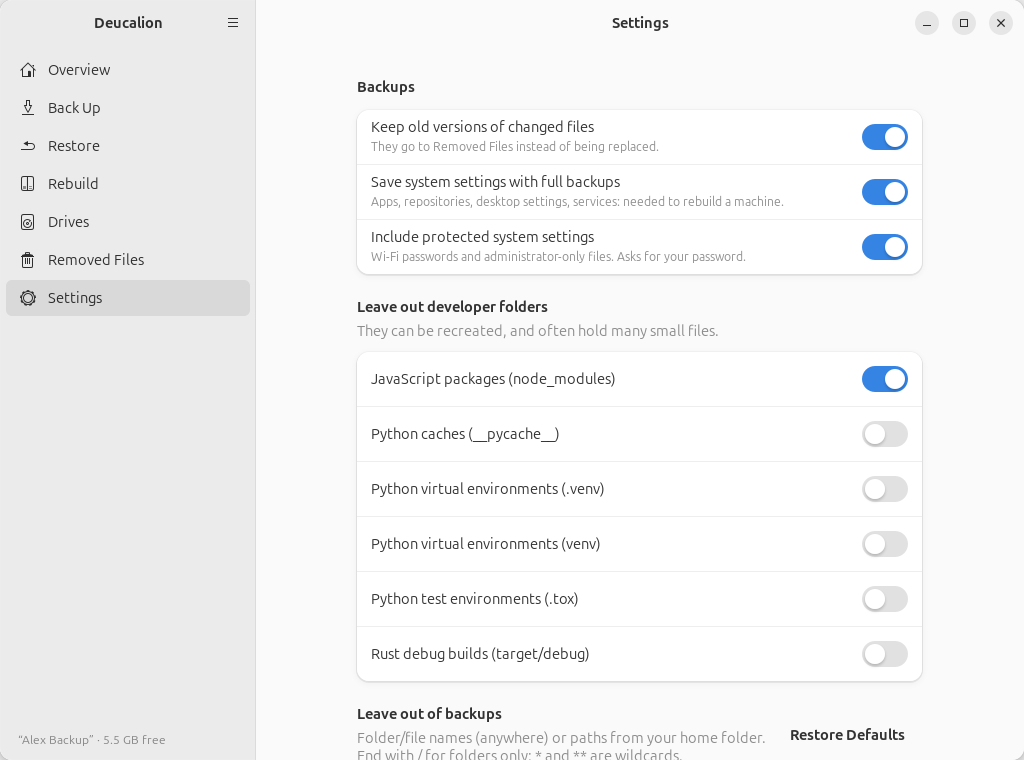
In this example, Alex leaves out the Videos folder (it is copied elsewhere) and node_modules
folders.
- Open Deucalion and go to Settings.
-
For programmers' folders, turn on the switch under Leave out developer folders, for example JavaScript packages (node_modules).
-
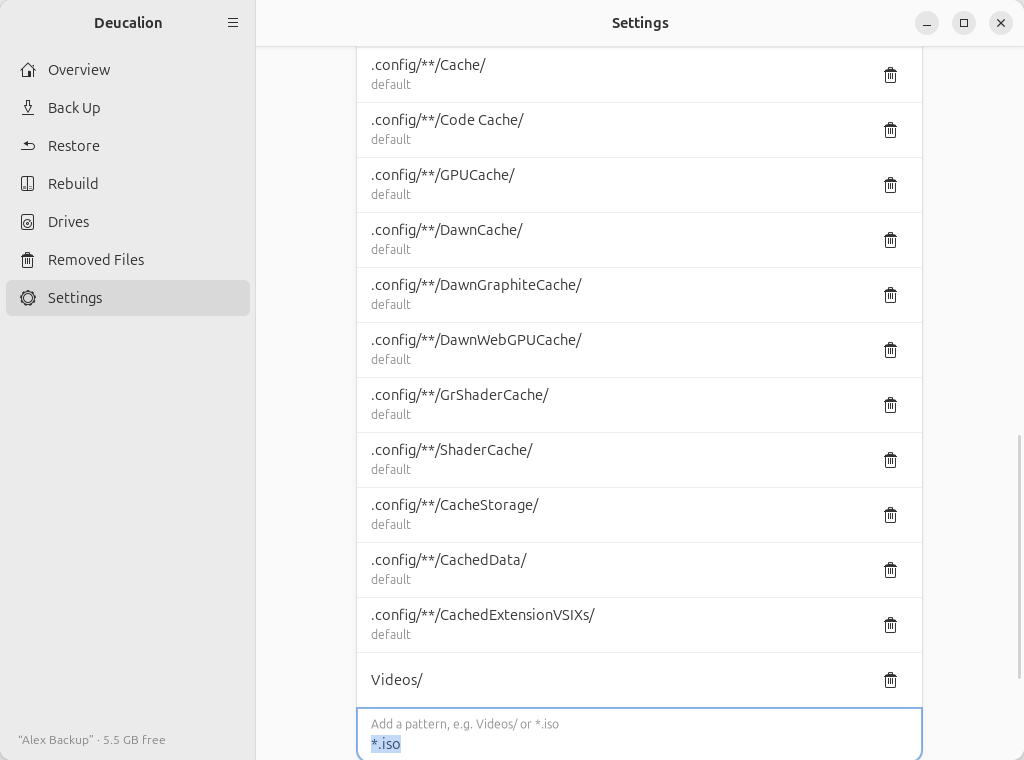
For anything else, scroll to Leave out of backups, type a pattern in Add a pattern, e.g. Videos/ or *.iso and press Enter:
Videos/leaves out every folder calledVideos;*.isoleaves out every file ending in.iso;Projects/old/leaves out only~/Projects/old.
-
To remove a pattern, click its bin button. Restore Defaults puts back the default list.
-
Add patterns (in quotes):
$ deucalion exclude add "Videos/" "*.iso" .cache/ .thumbnails/ .local/share/Trash/ .local/share/recently-used.xbel .local/share/containers/ .var/app/*/cache/ .npm/_cacache/ .config/**/Cache/ .config/**/Code Cache/ .config/**/GPUCache/ .config/**/DawnCache/ .config/**/DawnGraphiteCache/ .config/**/DawnWebGPUCache/ .config/**/GrShaderCache/ .config/**/ShaderCache/ .config/**/CacheStorage/ .config/**/CachedData/ .config/**/CachedExtensionVSIXs/ Videos/ *.iso -
Remove one:
deucalion exclude remove "*.iso" -
Programmers' folders are patterns too:
deucalion exclude add node_modules/. deucalion excludeshows the list;deucalion exclude resetputs back the defaults.
What happens to what was already backed up
The next full backup moves what you now leave out from the backup to Removed Files (it counts as Gone). It is not deleted: it stays in Removed Files until you empty it.
$ deucalion backup --dry-run
Backing up to Alex Backup  /media/alex/Alex Backup/Deucalion-Backup
Saving the system recipe (packages, settings, services)…
Backup plan (full: everything)
  New files:               2   293.0 KB
  Changed files:           1   1.4 KB (previous versions go to _removed/)
  Gone/excluded:           2   333.8 MB (moved to _removed/)
  Unchanged:             645   156.7 MB
  Largest folders in this backup:
       86.0 MB          34 files  home/Pictures
       63.4 MB           3 files  home/Music
        5.8 MB         371 files  home/Deucalion
      875.1 KB          63 files  home/.local
      432.9 KB          11 files  home/Documents
      293.0 KB           1 files  extras/shared/scans
      120.3 KB          67 files  home/Projects
       81.3 KB          61 files  system/etc
       49.0 KB          13 files  system/packages
        4.8 KB           6 files  home (files)
        2.1 KB           5 files  home/.config
        2.0 KB           3 files  system/services
  Warnings (1):
    System settings (/etc, network) were not updated because administrator access was not used; the copy from an earlier backup is kept.
Dry run: nothing was copied. Add --details to list every file.
Here, 2 items (the Videos folder and the node_modules folder) will move to Removed Files.
What you have now: smaller, faster backups.
Next steps: see Exclusion patterns for more examples, and Free space on the drive to free the space the old copies take.